Students & families
Online payments
SCSD2 parents and guardians may make electronic payments for textbook fees and meal accounts through Harmony Family Access. Follow the steps below to complete a payment.
Log in to Harmony
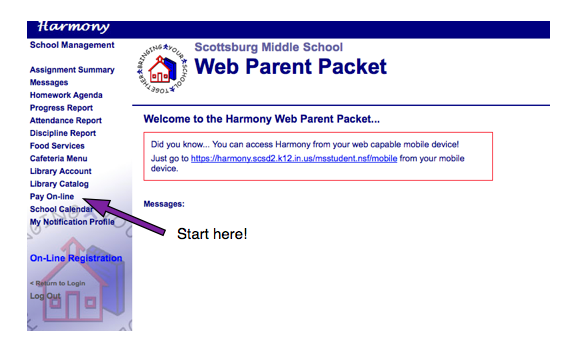
Log in to your child's Harmony account at Harmony Family Access. Once logged in, select the Pay On-line option from the left-hand column.
Enter your payment details
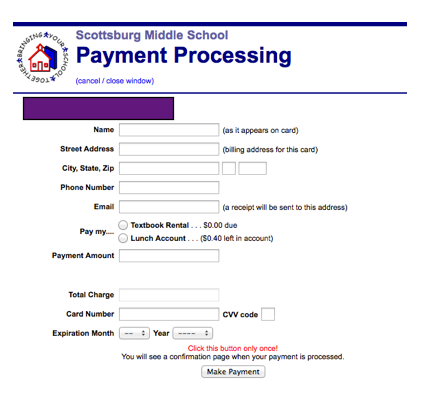
A payment form will open showing your child's name and their current lunch and textbook balances. Enter your credit card information and an email address where your payment receipt will be sent.
Submit your payment
Click the Make a Payment button once only per transaction. Clicking multiple times may result in duplicate charges.
Frequently asked questions
When does my deposit show up in the account?
Payments made before midnight will show up in the account the next day. Payments made after midnight will also show up the following day.
Will I be charged extra for using this system?
When you enter the payment amount, an automatic charge of $1.00 per transaction will be added to your total. This fee covers the banking cost of the transaction.
Can I make payments for multiple students at one time?
No. The payment system links to accounts individually. Transactions must be completed one at a time through each student's Harmony portal.
Is paying on Harmony secure?
Yes. Our Harmony website is protected with industry-standard SSL data encryption. Harmony also utilizes the Skipjack Transaction Network — a secure, high-speed payment gateway with one of the strongest data encryption protocols available. Your financial information is never stored in our system. You will be prompted to enter your credit card information each time you make an online payment.
How will I know that my payment went through?
You will receive a confirmation email with a receipt number and transaction number. After your transaction posts (after midnight on your payment date), you can view your student's lunch or textbook fee balance in Harmony to confirm the payment. If you have questions or issues, email tmosier@scsd2.k12.in.us or call (812) 752-8921 ext. 1044.
Can I still make a payment with check or cash?
Yes. The traditional methods of cash or check payment remain in place. Students or parents can make payments any morning in the cafeteria, or any time during the day in the school office.
Ready to make a payment?
Log in to Harmony Family Access to get started.